Toolbar Adapter Device Commands
This API implements the Siebel Communication Toolbar Adapter interface enabling the integration into the Siebel Communication Server.
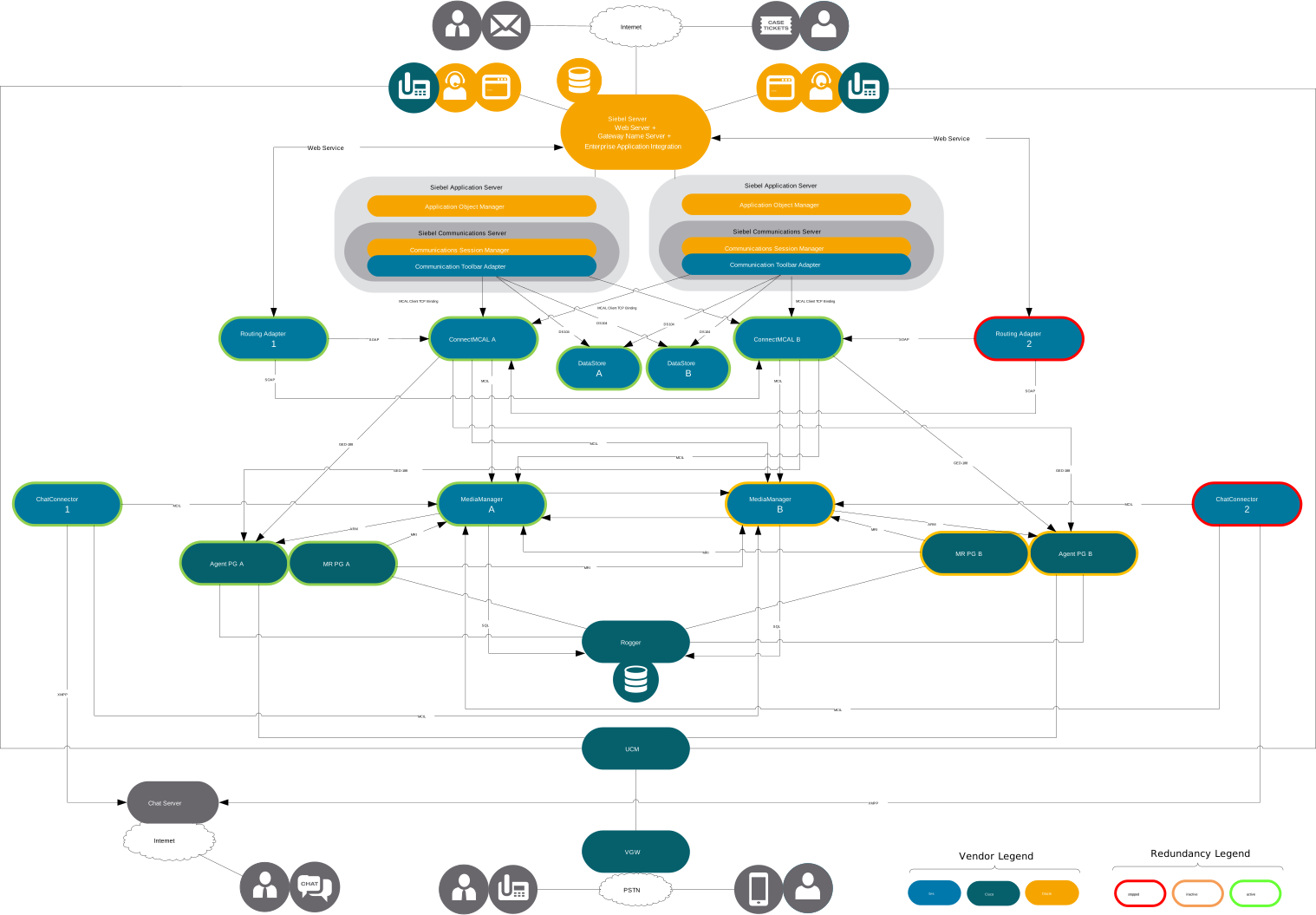
Siebel applications can send Device Commands to the Communication Toolbar Adapter. A Siebel Device Command consists of a command name and its parameters. The Siebel Communications Toolbar buttons send such commands.
Agent State Control
AgentLogon
Logs on an agent into the voice and mail domain.
Siebel-Command: AgentLogon
Type: Device Command
Control: Voice- and Media-Channel
Required Arguments:
| Argument | Type | Remarks |
|---|---|---|
| agentId | string | - |
| password | string | - |
| agentDevice | string | - |
Optional Arguments:
| Argument | Type | Remarks |
|---|---|---|
| agentInfo | string | default set to agentid |
| initialReady | numberstring (0 or 1) | default 0 |
| mobileAgent | numberstring (0 or 1 or "auto") | 0 or 1 or "auto" to extract the value from agentDevice, default "auto" |
| ctiPort | numberstring | required for mobile agent, if set to "auto", the value is extracted from agentDevice |
| connectionType | string | required for mobile agent, "nailed" for nailed mode or "callbycall" for call-by-call mode or "auto" to extract the value from agentDevice, default "auto" |
| loginByName | numberstring (0 or 1) | set to 1 if the field "agentId" contains the loginname instead of the agentid, default 0) |
| invokedByAutoLogin | numberstring (0 or 1, default 1) | |
| chatTaskLimit | numberstring | limits concurrent chat tasks per agent (max. 6) |
Remark about agentDevice:
For a simpler configuration in the definition file the value "auto" can now be set in the field's mobileAgent, ctiPort and
connectionType. If the value is set to "auto", the field agentDevice will be analyzed to extract the information from there.
The Syntax of agentDevice to extract the data is one of these:
- agentDevice
- ctiPort+mobilenumber
- ctiPort+mobilenumber+N
- ctiPort+mobilenumber+C
If no "+" sign exists, normal (not mobile) agent login is assumed.
If one or two "+" signs exist, mobile agent login is assumed.
"+N" means connection type "nailed", "+C" means connection type "callbycall".
If only one "+" exists, the parameter "connectionType" is used. |
AgentLogoff
Logs an agent off in all domains. This command is always enabled, when the agent is logged into any domain.
Siebel-Command: AgentLogoff
Type: Device Command
Control: Voice- and Media-Channel
Required Arguments:
none
Optional Arguments:
| Argument | Type | Remarks |
|---|---|---|
| logoutReasonCode | numberstring | default 0 |
AgentSetStateReadyVoice AgentSetStateReadyMail AgentSetStateReadyChat
Sets the agent state on Voice, Mail or Chat domain to Ready.
Siebel-Command: AgentSetStateReadyVoice AgentSetStateReadyMail AgentSetStateReadyChat
Type: Device Command
Control:: Voice- and Media-Channel
Required Arguments:
none
Optional Arguments:
none
Remark:
Buttons using these commands are displayed in "pressed" state when the current state is NotReady.
AgentSetStateReadyVoice2 AgentSetStateReadyMail2 AgentSetStateReadyChat2
Same functionality and parameters as AgentSetStateReadyVoice, AgentSetStateReadyMail, AgentSetStateReadyChat, but the state of this command is never set to "checked".
Siebel-Command: AgentSetStateReadyVoice2 AgentSetStateReadyMail2 AgentSetStateReadyChat2
Type: Device Command
Control: Agent State Control Commands on Voice- and Media-Channel
Required Arguments:
none
Optional Arguments:
none
Remark:
Buttons using these commands are never displayed in "pressed" state.
These commands can be used in a customized Communication Toolbar with two separate buttons for Ready and NotReady,
where the Ready button should never be displayed in "pressed" state.
AgentSetStateNotReadyVoice AgentSetStateNotReadyMail AgentSetStateNotReadyChat
Sets the agent state on Voice, Mail or Chat domain to NotReady.
Siebel-Command: AgentSetStateNotReadyVoice AgentSetStateNotReadyMail AgentSetStateNotReadyChat
Type: Device Command
Control: Voice- and Media-Channel
Required Arguments:
none
Optional Arguments:
| Argument | Type | Remarks |
|---|---|---|
| agentNotReadyReasonCode | numberstring | default 0 |
AgentChangeNotReadyReasonVoice AgentChangeNotReadyReasonMail AgentChangeNotReadyReasonChat
Changes the NotReady reason on Voice, Mail or Chat domain while the current state already is NotReady, without leaving NotReady state.
Siebel-Command: AgentChangeNotReadyReasonVoice AgentChangeNotReadyReasonMail AgentChangeNotReadyReasonChat
Type: Device Command
Control: Voice- and Media-Channel
Required Arguments:
| Argument | Type | Remarks |
|---|---|---|
| agentNotReadyReasonCode | numberstring | default 0 |
Optional Arguments:
none
AgentSetAfterCallWorkVoice
Selects wrap-up after the current call.
Siebel-Command: AgentSetAfterCallWorkVoice
Type: Device Command
Control: Voice- and Media-Channel
Required Arguments:
none
Optional Arguments:
none
AgentEndAfterCallWorkVoice
Ends wrap-up state.
Siebel-Command: AgentEndAfterCallWorkVoice
Type: Device Command
Control: Voice- and Media-Channel
Required Arguments:
| Argument | Type | Remarks |
|---|---|---|
| trackingId | numberstring | - |
Optional Arguments:
| Argument | Type | Remarks |
|---|---|---|
| reason | string | - |
| notReady | boolean (TRUE or FALSE) | default FALSE |
Remark for parameter reason:
This parameter can contain one not ready reason (numeric string) and one wrap-up reason (string starting with W),
separated by a comma. Before the wrap-up reason is sent to CCE, the "W" prefix is removed.
Work Item Control
SuspendDeselectedWorkItem
The voice call or task that belongs to the WorkItem selected in the WorkItemList in Siebel Web Client will be set to hold/paused.
Siebel-Command: SuspendDeselectedWorkItem
Type: Device Command
Control: Voice- and Media-Channels
Required Arguments:
| Argument | Type | Remarks |
|---|---|---|
| trackingId | string | - |
Optional Arguments:
none
ResumeSelectedWorkItem
The call that belongs to the WorkItem deselected in the WorkItemList in Siebel Web Client will be retrieved/resumed.
Siebel-Command: ResumeSelectedWorkItem
Type: Device Command
Control: Voice- and Media-Channels
Required Arguments:
| Argument | Type | Remarks |
|---|---|---|
| trackingId | string | - |
Optional Arguments:
none
Call Control
AnswerCall
Answers the currently ringing call.
Siebel-Command: AnswerCall
Type: Device Command
Control:: Voice-Channel
Required Arguments:
none
Optional Arguments:
| Argument | Type | Remarks |
|---|---|---|
| localCallData | string | - |
Remark for localCallData:
You can optionally attach a string to the call. This string will be available in subsequent call events for this call, i.e.
to trigger a specific set of event handlers for the call.
AlternateCall
Alternates between currently active and held call.
Siebel-Command: AlternateCall
Type: Device Command
Control: Voice-Channel
Required Arguments:
| Argument | Type | Remarks |
|---|---|---|
| trackingId | string | - |
Optional Arguments:
none
ConferenceComplete
Completes an initiated conference.
Siebel-Command: ConferenceComplete
Type: Device Command
Control: Voice-Channel
Required Arguments:
| Argument | Type | Remarks |
|---|---|---|
| trackingId | string | - |
Optional Arguments: none
ConferenceConsultationCall
Initiates a conference.
Siebel-Command: ConferenceConsultationCall
Type: Device Command
Control: Voice-Channel
Required Arguments:
| Argument | Type | Remarks |
|---|---|---|
| trackingId | string | - |
| consultedDevice | string | - |
Optional Arguments:
| Argument | Type | Remarks |
|---|---|---|
| perVar1..10 | string | - |
| ECC.VarName1 .. ECC.VarNameN | string | - |
HoldCall
Holds the current call.
Siebel-Command: HoldCall
Type: Device Command
Control: Voice-Channel
Required Arguments:
| Argument | Type | Remarks |
|---|---|---|
| trackingId | string | - |
Optional Arguments: none
MakeCall
Initiates an outgoing call.
Siebel-Command: MakeCall
Type: Device Command
Control: Voice-Channel
Required Arguments:
| Argument | Type | Remarks |
|---|---|---|
| calledDirectoryNumber | numberstring | =Number to dial |
Optional Arguments:
| Argument | Type | Remarks |
|---|---|---|
| perVar1..10 | string | - |
| ECC.VarName1 .. ECC.VarNameN | string | - |
ReleaseCall
Releases the current call.
Siebel-Command: ReleaseCall
Type: Device Command
Control: Voice-Channel
Required Arguments:
| Argument | Type | Remarks |
|---|---|---|
| trackingId | string | - |
Optional Arguments:
none
ReconnectCall
Clears the active call and retrieves the held call.
Siebel-Command: ReconnectCall
Type: Device Command
Control: Voice-Channel
Required Arguments:
| Argument | Type | Remarks |
|---|---|---|
| trackingId | string | - |
Optional Arguments:
none
RetrieveCall
Retrieves the held call.
Siebel-Command: RetrieveCall
Type: Device Command
Control: Voice-Channel
Required Arguments:
| Argument | Type | Remarks |
|---|---|---|
| trackingId | string | - |
Optional Arguments:
none
SendDtmfString
Sends DTMF tones on phone.
Siebel-Command: SendDtmfString
Type: Device Command
Control: Voice-Channel
Required Arguments:
| Argument | Type | Remarks |
|---|---|---|
| trackingId | string | - |
| dtmfString | string | - |
Optional Arguments:
none
TransferComplete
Completes the initiated transfer.
Siebel-Command: TransferComplete
Type: Device Command
Control: Voice-Channel
Required Arguments:
| Argument | Type | Remarks |
|---|---|---|
| trackingId | string | - |
Optional Arguments:
none
TransferConsultationCall
Initiates a consultative transfer.
Siebel-Command: TransferConsultationCall
Type: Device Command
Control: Voice-Channel
Required Arguments:
| Argument | Type | Remarks |
|---|---|---|
| trackingId | string | - |
| consultedDevice | string | - |
Optional Arguments:
| Argument | Type | Remarks |
|---|---|---|
| perVar1..10 | string | - |
| ECC.VarName1 .. ECC.VarNameN | string | - |
SingleStepTransferCall
desc.
Siebel-Command: SingleStepTransferCall
Type: Device Command
Control: Voice-Channel
Required Arguments:
| Argument | Type | Remarks |
|---|---|---|
| trackingId | string | - |
| transferredTo | string | =Number to dial |
Optional Arguments:
| Argument | Type | Remarks |
|---|---|---|
| perVar1..10 | string | - |
| ECC.VarName1 .. ECC.VarNameN | string | - |
SetCallData
Updates call context data.
Siebel-Command: SetCallData
Type: Device Command
Control: Voice-Channel
Required Arguments:
| Argument | Type | Remarks |
|---|---|---|
| trackingId | string | - |
Optional Arguments:
| Argument | Type | Remarks |
|---|---|---|
| perVar1..10 | string | - |
| ECC.VarName1 .. ECC.VarNameN | string | - |
| wrapupData | string | - |
Outbound Call Control
PreviewCallAccept
Accepts an offered preview outbound call. If the agent accepts the call, the customer will be dialed and transferred to the agent.
Siebel-Command: PreviewCallAccept
Type: Device Command
Control: Voice-Channel
Required Arguments:
| Argument | Type | Remarks |
|---|---|---|
| trackingId | string | - |
Optional Arguments:
none
Remark:
Accepts an offered preview outbound call. If the agent accepts the call, the customer will be dialed and transferred to the agent.
PreviewCallReject
Rejects an offered preview outbound call. If the agent rejects the call, the agent will be "released". At this point, the system may deliver another preview outbound call or a new inbound call.
Siebel-Command: PreviewCallReject
Type: Device Command
Control: Voice-Channel
Required Arguments:
| Argument | Type | Remarks |
|---|---|---|
| trackingId | string | - |
Optional Arguments:
none
PreviewCallRejectClose
Rejects and closes the offered preview outbound call. If the agent "Rejects-Closes" the call, the agent will be "released" and the record is closed, so it will not be called again. At this point, the system may deliver the agent another Preview outbound call or a new inbound call.
Siebel-Command: PreviewCallRejectClose
Type: Device Command
Control: Voice-Channel
Required Arguments:
| Argument | Type | Remarks |
|---|---|---|
| trackingId | string | - |
Optional Arguments:
none
ScheduleCallback
The callback feature allows scheduling customer callbacks for a specific datetime, so customers receive callbacks. Agents can either specify a datetime or a relative time in minutes. If the customer wants to be called back on another number, this can be specified in the callback number parameter.
Siebel-Command: ScheduleCallback
Type: Device Command
Control: Voice-Channel
Required Arguments:
| Argument | Type | Remarks |
|---|---|---|
| trackingId | string | - |
Arguments:
| Argument | Type | Remarks |
|---|---|---|
| callbackcancel | numberstring (0 or 1) | default 0 |
| callbackduedatetime | datestring format: MM/dd/yyy HH:mm:ss) | - |
| callbackinminutes | numberstring | - |
| callbacknumber | numberstring | - |
ClassifyOutboundCall
For Direct Preview calls, any connected customer call is classified as VOICE by the Dialer (default). To reclassify the call result, the agent has the choice to select one of the following options.
Siebel-Command: ClassifyOutboundCall
Type: Device Command
Control: Voice-Channel
Required Arguments:
| Argument | Type | Remarks |
|---|---|---|
| trackingId | string | - |
One of the following arguments is required:
| Argument | Type | Remarks |
|---|---|---|
| classifyasvoice | numberstring (0 or 1) | default 0 |
| classifyasansweringmachine | numberstring (0 or 1) | default 0 |
| classifyasfax | numberstring (0 or 1) | default 0 |
| classifyasinvalid | numberstring (0 or 1) | default 0 |
Task Control
StartEmailTask
Accepts the Email offered task.
Siebel-Command: StartEmailTask
Type: Device Command
Control: Media-Channels
Required Arguments:
none
Optional Arguments:
none
RejectTask
Rejects the offered task.
Siebel-Command: RejectTask
Type: Device Command
Control: Media-Channels
Required Arguments: none
Optional Arguments: none
WrapupTask
Sets the task to a wrap-up state.
Siebel-Command: WrapupTask
Type: Device Command
Control: Media-Channels
Required Arguments:
| Argument | Type | Remarks |
|---|---|---|
| trackingId | string | - |
| reason | string | - |
Optional Arguments:
none
PauseTask
Pauses the active task.
Siebel-Command: PauseTask
Type: Device Command
Control: Media-Channels
Required Arguments:
| Argument | Type | Remarks |
|---|---|---|
| trackingId | string | - |
Optional Arguments:
none
ResumeTask
Resumes the active task.
Siebel-Command: ResumeTask
Type: Device Command
Control: Media-Channels
Required Arguments:
| Argument | Type | Remarks |
|---|---|---|
| trackingId | string | - |
Optional Arguments:
none
RerouteTask
Reroutes the active task.
Siebel-Command: RerouteTask
Type: Device Command
Control: Media-Channels
Required Arguments:
| Argument | Type | Remarks |
|---|---|---|
| trackingId | string | - |
| routetarget | string | - |
Optional Arguments:
none
Remark: RerouteTask puts the active task back in the CCE queue. The same routing parameters as with the original route are used.
RerouteTaskWithParam
Reroutes the active task.
Siebel-Command: RerouteTaskWithParam
Type: Device Command
Control: Media-Channels
Required Arguments:
| Argument | Type | Remarks |
|---|---|---|
| trackingId | string | - |
Required one of these Arguments:
| Argument | Type | Remarks |
|---|---|---|
| rerouteScript | string | CCE ScriptSelector |
| preferredAgentID or preferredAgentInfo | string | - |
Remark: 'RerouteTaskWithParam' puts the active task back in the CCE queue and an agent ID (i.e. Siebel user ID) or CCE script selector can be specified for preferred agent or skill group routing.
EndTask
Ends the active task (or paused or wrapped up task).
Siebel-Command: EndTask
Type: Device Command
Control: Media-Channels
Required Arguments:
| Argument | Type | Remarks |
|---|---|---|
| trackingId | string | - |
| wrapupData | string | - |
Optional Arguments: none
AcceptChatWork
AcceptChatWork.
Siebel-Command: AcceptChatWork
Type: Device Command
Control: Media-Channels
Required Arguments: none
Optional Arguments: none
SendChatMessage
Sends chat message to customer.
Siebel-Command: SendChatMessage
Type: Device Command
Control: Media-Channels
Required Arguments:
| Argument | Type | Remarks |
|---|---|---|
| TaskId | string | - |
| Data | string | - |
Optional Arguments: none
Remark: MCAL-Command: 'SendMessage'
SendAgentTyping
desc.
Siebel-Command: SendAgentTyping
Type: Device Command
Control: Media-Channels
Required Arguments:
| Argument | Type | Remarks |
|---|---|---|
| TaskId | string | - |
Optional Arguments: none
Remark: MCAL-Command: 'SendMessage'